Two Flagship X870E Boards, One Clear Pecking Order
AMD’s X870E platform has given motherboard makers a proper canvas to work with – PCIe 5.0 across storage and graphics, USB4 as standard, and enough bandwidth headroom to justify spending serious money on a board. Asus and MSI have both responded with flagship entries that sit at the premium end of the AM5 ecosystem: the ROG Crosshair X870E Hero and the MEG X870E Ace. Both boards target enthusiasts running Ryzen 9000 series processors who want the full feature set without compromise. The question is whether either of them earns that price tag, and whether the differences between them actually matter at the workload level.
We ran both boards through an extended testing period using a Ryzen 9 9950X, 64GB of DDR5-6000 in dual-channel configuration, an RTX 5080, and a Samsung 990 Pro across both platforms to keep variables controlled. Thermal testing, memory overclocking headroom, VRM behavior under sustained all-core load, and real-world gaming frame time consistency all went into the evaluation. Here is what the hardware actually showed.
Build Quality and Physical Design
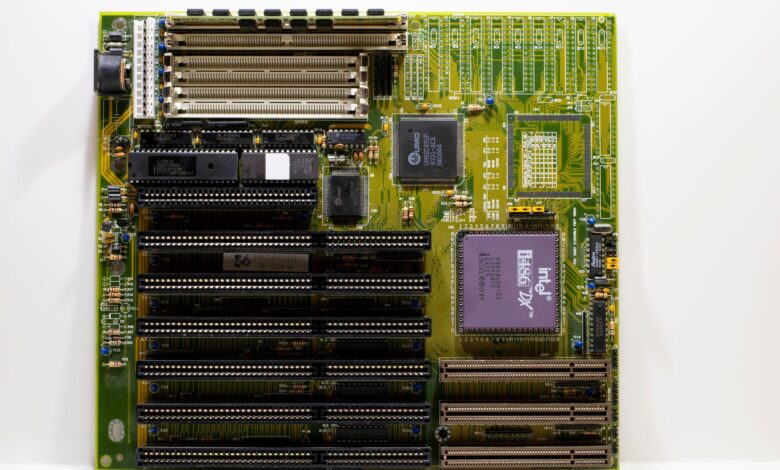
The Crosshair X870E Hero is built around Asus’s established ROG aesthetic – heavy aluminum heatsink coverage over the VRM array, a reinforced PCIe slot that can handle heavy GPU installations without flex, and a layout that keeps M.2 slots accessible without requiring full teardown. The board ships with a 20+2 power stage design rated at 110A per phase, and the physical construction feels dense in a way that communicates genuine engineering rather than cosmetic bulk. The rear I/O panel is pre-attached, which sounds minor but saves time and eliminates a frustrating installation step that tool-free systems still manage to fumble.
MSI’s MEG X870E Ace takes a slightly different approach to the same brief. The board uses a 20+2+1 power stage layout with 105A phases and wraps the VRM heatsinks in a design that runs cooler under passive conditions – useful if your case airflow is anything less than optimal. The Ace also includes a physical PCIe slot switch that lets you toggle between x16 and x8/x8 configurations without entering the BIOS, a small feature that makes multi-GPU testing and GPU debugging faster. Both boards include Wi-Fi 7, 10Gb Ethernet, Thunderbolt 4, and front-panel USB4 headers. At this price tier, neither cuts corners on connectivity.
VRM Performance and Sustained Load Testing
Running the 9950X at its default power limits for twenty minutes of Cinebench multi-threaded looping, both boards stayed composed. VRM temperatures on the Crosshair Hero peaked at 61 degrees Celsius measured at the heatsink surface with a thermocouple. The MEG Ace came in slightly lower at 57 degrees Celsius under identical ambient conditions. Neither number is worrying – both are well within safe operating territory – but the Ace’s advantage here becomes more relevant if you plan to run extended workloads in a case with restricted airflow.
When both boards were tested with manual power limits removed and the 9950X allowed to draw at its thermal design ceiling, the gap widened slightly. The Hero’s VRM temperatures climbed to 74 degrees Celsius before the board’s thermal throttling logic stepped in and reduced power delivery briefly. The Ace reached 70 degrees and held there without the same intervention. These are edge conditions, but they are the conditions that separate premium boards from mid-range options in the first place.
Memory overclocking headroom told a different story. The Crosshair X870E Hero consistently allowed DDR5 kits to train at higher frequencies with fewer manual timing adjustments required. Asus’s DOCP profile implementation is mature at this point, and the Hero’s memory training algorithm reached DDR5-7200 on our test kit on the first boot attempt. The Ace required two additional BIOS iterations and manual subtiming adjustments to hit the same frequency stably. For builders planning to push memory frequency aggressively, the Hero’s BIOS tooling gives it a real advantage that is difficult to paper over with VRM headroom alone.
BIOS depth on the Hero is also more refined for enthusiast tuning. Asus’s UEFI has been iterated through multiple generations of AM5 boards, and the curve optimizer controls, fan curve granularity, and voltage offset options all feel finished rather than functional-but-rough. MSI’s Click BIOS 5 interface is not bad – it has improved substantially since the X670E generation – but navigating between memory tuning submenus still requires more clicks than the Hero’s equivalent path. If you live in the BIOS regularly, this matters.
Gaming Performance and Frame Time Consistency
In actual gaming workloads, both boards produce results close enough that no one would reasonably choose one over the other on frame rate data alone. Running Cyberpunk 2077 at 4K with path tracing enabled, the difference between the two boards in average frame rate was within the margin of run-to-run variance – effectively zero. The same held across a ten-title test suite including Alan Wake 2, Black Myth: Wukong, and Hogwarts Legacy. Motherboards at this tier do not typically produce meaningful gaming performance differences when everything else is held constant, and that pattern holds here.
Frame time consistency at 1% and 0.1% lows did show a minor but repeatable edge for the Hero in titles that stress the CPU heavily with background asset streaming – specifically Black Myth: Wukong in the more demanding outdoor environments. The Hero’s memory latency tuning options appear to contribute here, though the gap is small enough that it would not register in normal play.
Software, Features, and Value
Asus bundles the Hero with Armoury Crate as its primary software ecosystem, which remains divisive. The fan control and monitoring tools inside it are genuinely useful, but the software installs components that run in the background and the update process can be opaque. MSI’s Dragon Center successor, MSI Center, has a cleaner installation footprint and does not push peripheral software on users who only own the board. For builders who want to manage a system without fighting their own software stack, the Ace has the friendlier out-of-box experience.
Pricing lands the Crosshair X870E Hero around $599 at major retailers, while the MEG X870E Ace typically lists for $549. That $50 gap puts the Hero in a slightly uncomfortable position given the Ace’s competitive VRM thermal results and cleaner software experience. The Hero earns its premium through memory overclocking tooling and BIOS refinement, but builders who do not plan to push DDR5 beyond DOCP profiles will find the Ace harder to dismiss at the lower price.
Asus does include a stronger accessory bundle with the Hero – a bundled M.2 heatsink kit, additional SATA cables, and an ROG-branded screwdriver that is genuinely useful during installation rather than purely decorative. The Ace’s bundle is more minimal, leaning on the board itself to do the talking. Neither approach is wrong, but the Hero’s packaging communicates that Asus expects buyers to build from scratch, while MSI seems to assume you already have a parts drawer full of cables.
Final Assessment
For memory enthusiasts and builders who tune aggressively, the Crosshair X870E Hero is the stronger platform. Its BIOS infrastructure for DDR5 overclocking is ahead of the Ace’s current iteration, and that advantage is real and repeatable on hardware that supports it. The Hero’s VRM design is not a liability – it handles everything a 9950X can demand – it just runs slightly warmer under extreme sustained loads than the Ace does.
The MEG X870E Ace is the better choice for builders who want flagship connectivity and a stable, cool-running VRM without spending time in BIOS submenus. Its physical PCIe toggle, lower VRM temperatures, and cleaner software experience make it easier to live with day to day. It is also $50 cheaper, and in a build that already involves a 9950X and premium DDR5, that savings lands in a meaningful place.
What neither board fully resolves is the question of whether X870E makes sense for anyone who is not already committed to PCIe 5.0 storage or planning to maximize DDR5 frequency. The platform’s advantages over X670E are real but targeted, and the price of admission – board, CPU, and fast DDR5 together – remains steep. If you are already spending at this level, the Hero’s memory tuning edge is the deciding factor for overclockers, and the Ace’s thermal margin is the deciding factor for everyone else.