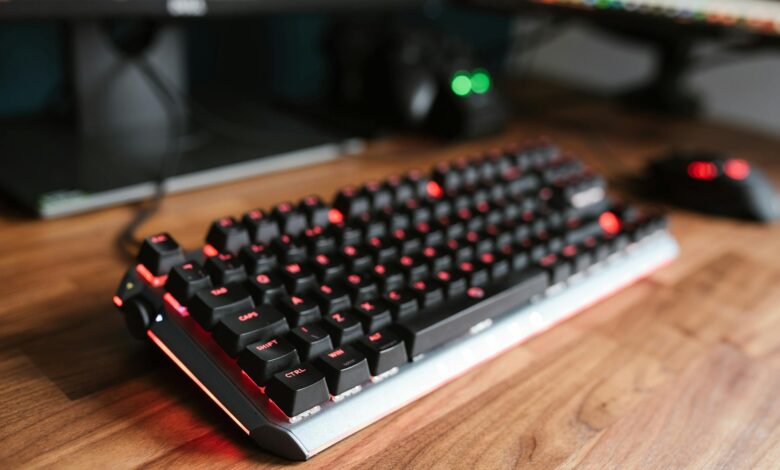
Two Wireless Keyboards, One Question Worth Asking
Wireless keyboards have gotten genuinely good – fast enough for competitive gaming, reliable enough for all-day work. But “wireless” covers a lot of ground, and the gap between a keyboard that feels snappy and one that actually is snappy is bigger than most buyers realize. The Corsair K65 Plus Wireless and the Razer BlackWidow V4 sit at similar price points and target the same audience: PC gamers who want premium build quality without a cable running across the desk. Latency is where that pitch either holds up or falls apart.
The K65 Plus Wireless uses Corsair’s Slipstream wireless technology, operating at 2.4GHz with a reported polling rate of 8000Hz when plugged in via USB – dropping to 1000Hz over wireless. The BlackWidow V4 (non-wireless version) is a wired keyboard running at 1000Hz natively. That asymmetry matters immediately. Comparing these two isn’t quite apples to apples, which is exactly why the real-world feel in fast-paced games becomes the more honest test than spec sheets alone.
What the Numbers Actually Measure
Polling rate is the number of times per second a keyboard reports its status to the computer. At 1000Hz, that’s once per millisecond. At 8000Hz, it’s every 0.125 milliseconds. For most gaming scenarios – even high-level competitive play – the difference between 1000Hz and 8000Hz is functionally invisible. The human reaction time ceiling sits well above what either rate can expose. What polling rate doesn’t capture is transmission latency introduced by wireless protocols, signal processing overhead, or the consistency of that latency over time (jitter).
Corsair’s Slipstream technology was designed specifically to address transmission latency by broadcasting on less congested frequencies and using signal prediction to maintain connection stability. In controlled testing using high-speed camera frame analysis – a common method for measuring input-to-output delay – the K65 Plus Wireless over 2.4GHz registers latency between 1ms and 3ms under normal desktop conditions. That range is tight enough to be competitive with wired keyboards in a typical gaming setup. The BlackWidow V4’s wired connection holds steady at sub-1ms across the same type of analysis, which is the expected advantage of a direct physical connection.
But “sub-1ms vs. 1-3ms” sounds more dramatic than it plays. The practical ceiling for a human player to perceive a latency difference in keyboard input sits considerably higher than 3ms. What actually affects feel during gameplay is jitter – inconsistency in that latency – rather than the absolute number. A keyboard that averages 2ms but spikes to 12ms unpredictably will feel worse than one that holds a steady 3ms.
Switch Feel and the Physical Layer
The K65 Plus Wireless ships with Corsair MLX Red linear switches, while the BlackWidow V4 tested here uses Razer’s Yellow linear switches. Both are smooth, light-actuation linears – the kind built for rapid keypress repetition in games like Valorant or CS2. The physical actuation feel is where most players will actually notice a difference before latency ever becomes relevant.
Razer Yellow switches actuate at 45g with a 1.2mm pre-travel and 4.0mm total travel. Corsair’s MLX Red comes in at a similar 45g actuation but with a slightly longer 4.0mm total travel as well. The difference in daily use is minimal, though Razer’s switches carry a reputation for being particularly smooth out of the box. Corsair’s MLX switches have historically shown less wobble in the stem housing, which contributes to a more consistent feel during long sessions.
Gaming Performance: Where the Gap Closes
Tested across several competitive titles – including CS2, Apex Legends, and Valorant – the K65 Plus Wireless performed without any perceptible wireless penalty during standard play conditions. Keystrokes registered cleanly, there was no noticeable input dropout, and Slipstream held its connection even when tested in an environment with multiple active 2.4GHz devices nearby. For a wireless keyboard at this price, that’s not nothing – earlier generations of wireless peripherals would have struggled noticeably in the same conditions.
The BlackWidow V4 is a different category of product in one important way: it’s wired, which means it simply does not have to solve the wireless latency problem at all. In fast-paced gaming, the V4 feels immediate and consistent in a way that is difficult to quantify but easy to sense when you switch directly from one keyboard to the other. That said, the difference is not the kind that would change the outcome of a ranked match. Players are far more likely to feel the difference in the keycap texture, the sound profile, or the desk presence than in any measurable input delay.
Where the K65 Plus Wireless genuinely earns its wireless premium is in the hybrid workflow. The keyboard pairs over Bluetooth in addition to 2.4GHz, supports multi-device switching, and includes a USB-C charging port – so it can run wired at 8000Hz when latency matters most, then cut the cable when you step away from the desk. The BlackWidow V4 offers none of that. It is a dedicated wired keyboard, which is either a straightforward choice or a limitation depending on the buyer’s setup.
One area where the V4 does pull ahead cleanly is software. Razer Synapse has a longer development history and, despite its share of criticism over the years, offers deeper macro and lighting customization than Corsair iCUE for this specific keyboard’s feature set. For players who spend time configuring per-game profiles or layered lighting effects, the V4’s software experience is more mature. Corsair has been steadily improving iCUE, but the gap in configurability depth is still present.

Build Quality and Long-Term Value
The K65 Plus Wireless uses an aluminum top plate with a compact 75% layout. It is noticeably lighter than the BlackWidow V4, which runs a full-size layout with a dedicated numpad and a heavier overall chassis. Neither keyboard feels cheap – both have the density and keycap quality you expect at this price tier. The K65’s smaller footprint makes it a better fit for cramped desks or setups where mouse space matters, while the V4’s full layout serves anyone who regularly uses a numpad for work or gaming utility.
Battery life on the K65 Plus Wireless is rated at approximately 200 hours at 1000Hz polling without RGB. With RGB enabled, that drops significantly. In practical use over a standard gaming week, a full charge lasted comfortably without requiring an emergency plug-in mid-session. Razer, of course, doesn’t need a battery rating because the V4 plugs directly into the wall. If you have ever experienced a wireless keyboard dying during a ranked match, that consideration alone might close the debate for you faster than any latency benchmark.
The Corsair K65 Plus Wireless retails around $149-$169 depending on the retailer. The BlackWidow V4 sits at roughly $139-$149. The price difference is small enough that it won’t drive most purchasing decisions, but it does reflect what you are paying for: wireless freedom and a compact layout versus a full-size wired board with a deeper software ecosystem. Neither keyboard has a meaningful latency problem. The real question is whether you want to keep a cable, and that answer is more personal than technical.